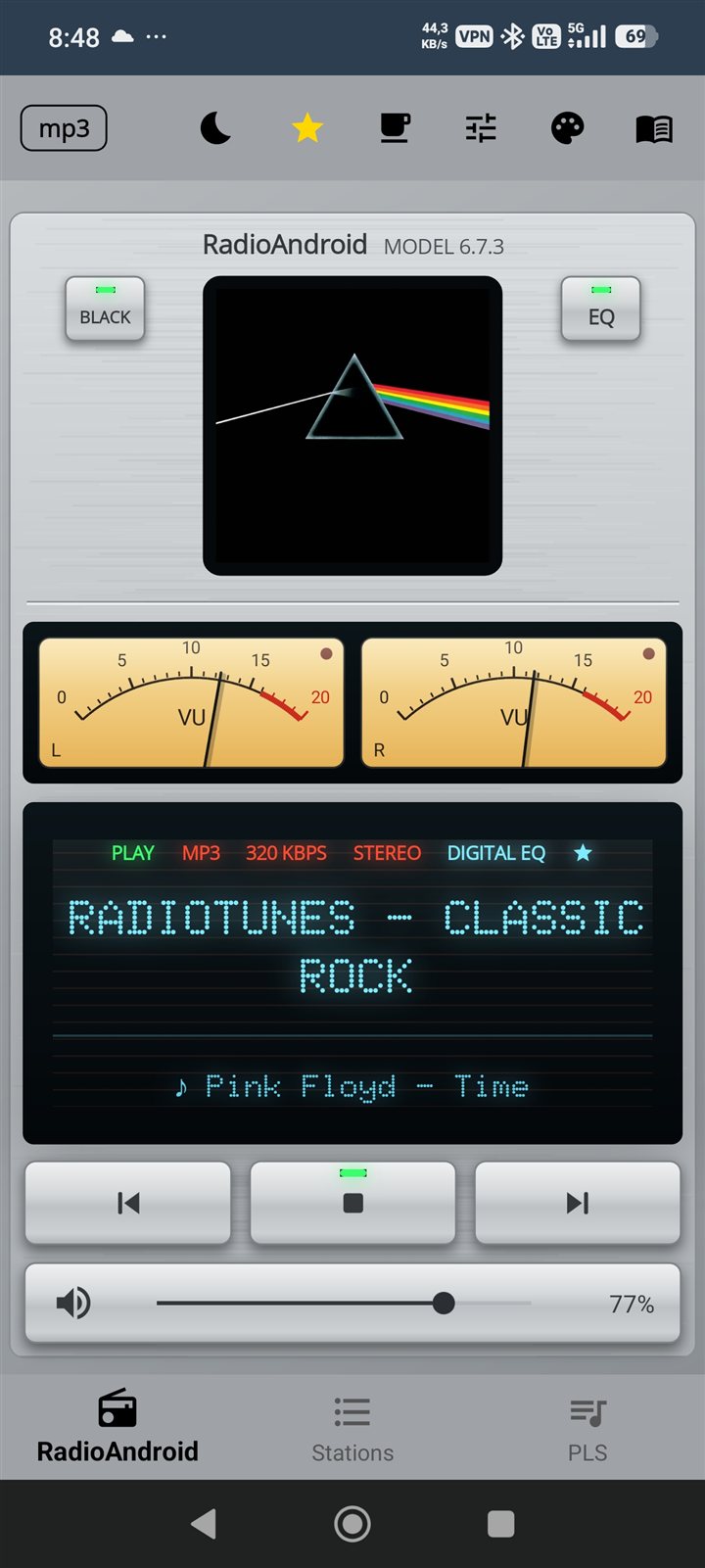
Technical Overview · May 2026

RadioAndroid 6.0

Built for everyday travel — car, bike, bus, train. An honest technical breakdown of what it does well and what it doesn't. You decide.

🚗 Built for Travel LibVLC Engine Unlimited Stations 10-Band Native EQ Android Auto C# / .NET MAUI Free · No Ads
Under the Hood
Why LibVLC matters for internet radio

Most Android radio apps rely on Android's built-in MediaPlayer or Google's ExoPlayer. RadioAndroid 6.0 uses LibVLC — the same engine behind VLC Media Player, trusted by 300+ million users worldwide. For internet streams, the difference is significant.

🌐

Protocol Coverage

Handles HTTP, HTTPS, HLS, AAC, MP3, Ogg Vorbis, DASH, ICY metadata and more — natively, without third-party plugins.

vs ExoPlayer: limited HLS, no ICY
🔁

Stream Reconnection

VLC's internal buffer management handles stream drops at the engine level. RadioAndroid adds a second app-level watchdog on top for double protection.

2-layer stability system
🎚️

Native 10-Band Equalizer

The EQ operates directly in the VLC audio pipeline — not via Android's AudioEffect API. This means it works on all streams, including low-bitrate and AAC.

60 Hz → 14 kHz · 10 bands

Low Latency Buffering

VLC's intelligent pre-buffering reduces stream startup time and minimises gaps when switching stations — especially on slow mobile connections.

Adaptive buffer management
📡

Cellular Fallback

When Wi-Fi drops, the app transparently switches to LTE/5G without interrupting playback. Handled at VLC transport layer.

Wi-Fi → LTE seamless switch
🔑

Private & Authenticated Streams

Services like RadioTunes, di.fm and similar platforms protect their premium streams with a personal access key embedded in the URL. RadioAndroid handles these natively — just paste your full personal stream URL and it plays instantly, exactly like any public station. Because LibVLC treats authenticated HTTP streams the same as open ones, it is likely to work with other subscription services that use the same approach.

RadioTunes · di.fm · personal key URLs · and more
🔓

Open Source · LGPL

LibVLC is open-source under LGPL licence. No vendor lock-in, no telemetry, no black-box audio processing.

Trusted by 300M+ users globally
10-Band LibVLC Equalizer — native audio pipeline

↑ Click any band to randomise the preset. The EQ runs inside the VLC audio pipeline — not Android's AudioEffect API — so it works on every stream format, including low-bitrate AAC and Ogg Vorbis. Presets can be saved and loaded by name at any time.

Database Model
Add any station — unlimited

Unlike catalogue-based apps that lock you into their own station list, RadioAndroid 6.0 lets you add any HTTP/HTTPS stream URL. Your database is limited only by what exists on the internet.

Your playlist,
your rules

Add, edit, delete and reorder any station. Both formats fully supported — save, load and edit manually in any text editor. No account needed, no cloud dependency.

💾 JSON — RadioAndroid native
[{"Nazwa":"RMF FM",
"Sciezka":"http://rs201-krk.rmfstream.pl/rmf_fm"},
{"Nazwa":"BBC World",
"Sciezka":"http://stream.live.vc.bbcmedia.co.uk/bbc_world_service"}]

Stores stations + favourites · human-readable

📋 PLS — VLC / Winamp compatible
[playlist]
NumberOfEntries=2
File1=http://rs201-krk.rmfstream.pl/rmf_fm
Title1=RMF FM
File2=http://stream.live.vc.bbcmedia.co.uk/bbc_world_service
Title2=BBC World

Works with VLC, Winamp and RadioAndroid

Add any HTTP / HTTPS stream URL
Full CRUD — create, read, update, delete
Save & load in JSON (native RadioAndroid format)
Save & load in PLS (VLC / Winamp compatible)
Export & share via Android Share intent (WhatsApp, email…)
Save & load named equalizer presets
Browse fmstream.org for thousands of URLs
No account, no cloud, no restrictions
Works fully offline once URLs are saved
Honest Assessment
What it does well — and what it doesn't

No app is perfect. Here's an honest breakdown so you can decide if RadioAndroid 6.0 is right for you.

Strengths
🚗
Built for everyday travelUsed daily in cars, bikes, buses and trains. Designed from day one as a radio for commuters and travellers.
🔧
LibVLC engineBest-in-class stream stability, protocol support and audio pipeline
🎚️
Native 10-band equalizerRuns inside VLC pipeline, works on all stream formats
📂
Unlimited custom stationsAdd any stream URL — no catalogue lock-in
🚗
Full Android AutoGoogle-reviewed, not just audio — full UI control while driving
📺
Chromecast TV & ChromeOSOne app for phone, tablet, TV box and laptop
📡
Wi-Fi → LTE fallbackSeamless switch, no playback interruption
🎨
VU Meter & skins5 visualiser modes, 8 colour palettes, custom background skins
🆓
Free — zero adsNo ads, no subscription, no tracking
BT watch controlControl playback from Bluetooth-enabled smartwatches via phone
💾
JSON / PLS import & exportPortable playlists, easy backup, VLC-compatible format
⚠️ Limitations
🍎
No iOS version yetMAUI port is planned but not released — Android only for now
💻
No Windows desktop app yetSame — planned via .NET MAUI but not available
📖
No built-in station catalogueYou must add stations manually or import from fmstream.org — no built-in discovery browser
No Wear OS supportSmartwatch apps on Wear OS not supported
☁️
No cloud syncPlaylist lives on device — manual backup required if you switch phones
👥
Smaller communityNot as well-known as TuneIn or iHeartRadio — fewer reviews, less forum support
🎙️
No podcast supportRadio streams only — no podcast directory or RSS feed support
🔍
No station searchNo in-app search across a station database — depends on external sources
📱
Single developer projectUpdates depend on one developer's availability
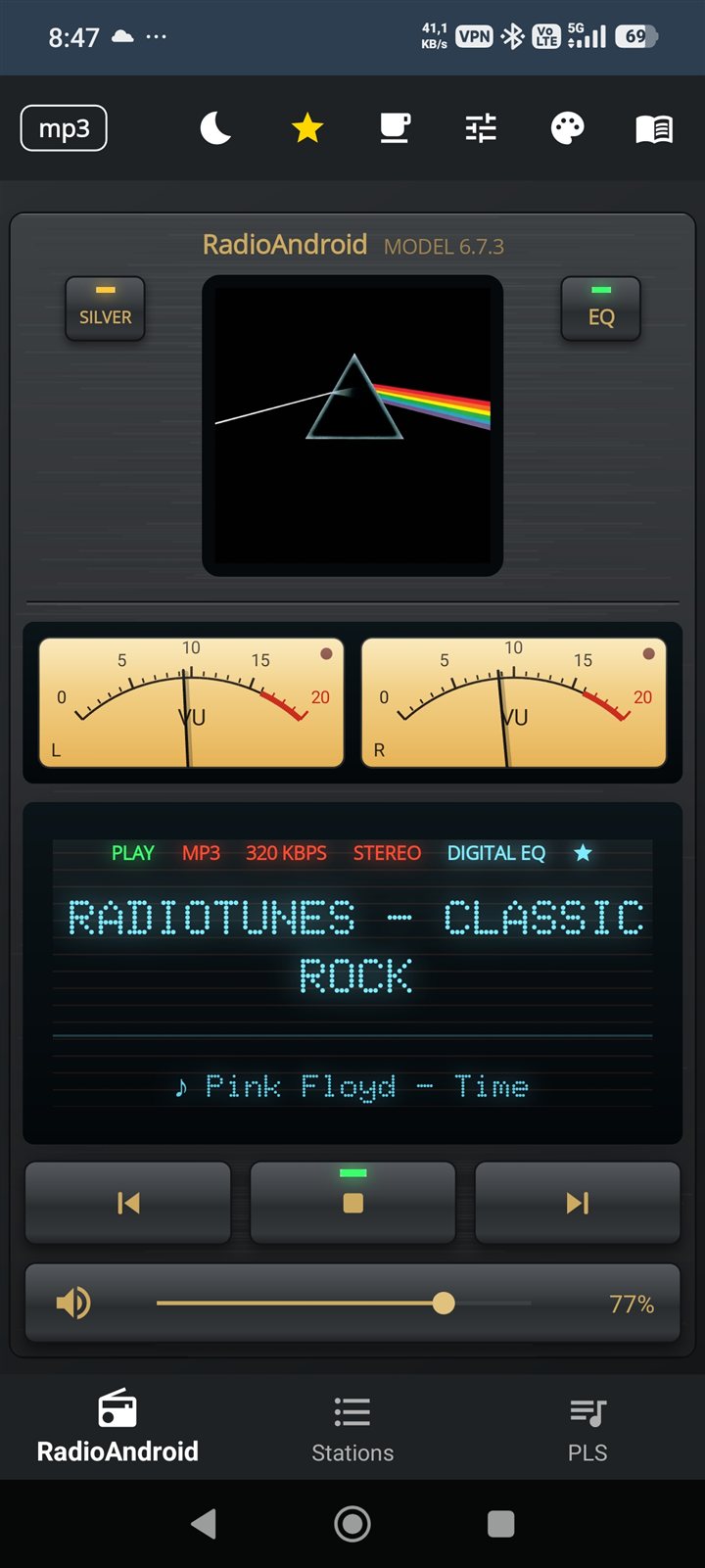
RadioAndroid 6.0 — Full Feature Table
📱

Ready to try RadioAndroid 6.0?

Free, no ads, no tracking. Built for everyday travel — car, bike, bus, train. Powered by LibVLC on Android 8–16.